
Question
In Template Designer 12, when in a Code editor field, why is the code-completion aid not working?
Answer
1. Ensure the C# Developer Pack 4.7.2 is installed. Here's the link:
2. Verify the Omnisharp process is running by looking at the Task Manager.
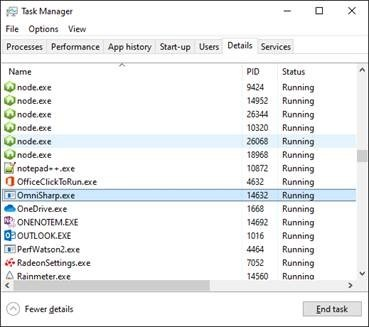
If the process is not present, check if the solution was generated. Solutions are generated by default in: C:\Users\[Username]\AppData\Local\Temp\Xpertdoc\Designer 12\Temp\[TemplateName], where the username and template name are specific to each user and template.
If the solution isn't there, there might be an issue with missing permissions to write in that folder. The path can be changed under the Template Designer 12 options.